> ## Documentation Index
> Fetch the complete documentation index at: https://docs.vectrade.io/llms.txt
> Use this file to discover all available pages before exploring further.
# Portfolio, Wallet & Watchlists
> Comprehensive guide to portfolio management on VTrade — real-time position monitoring, performance analytics, trade history, wallet transactions, and intelligent watchlist management with automated price alerts.
# Portfolio Management
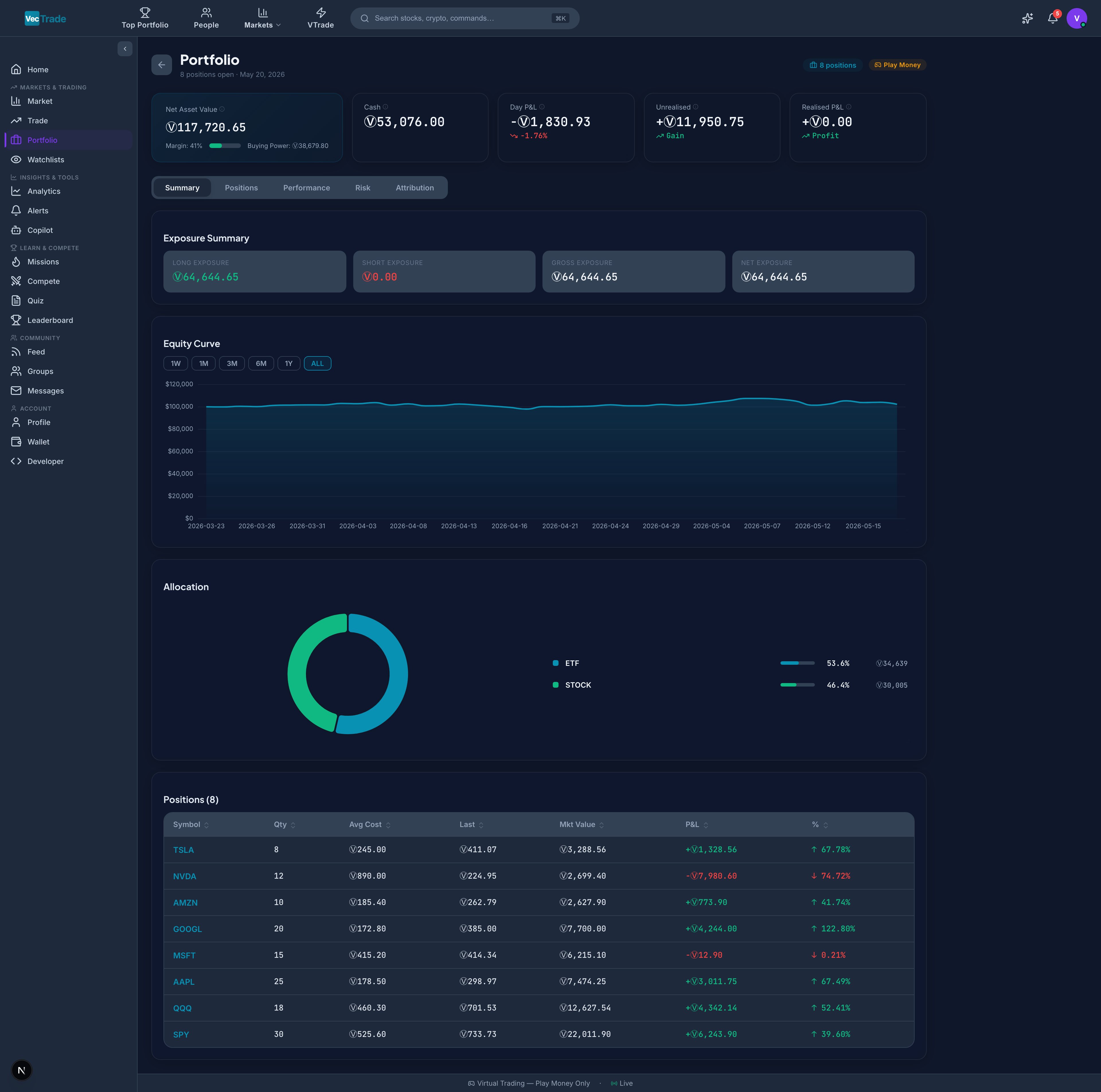
The Portfolio section provides a complete view of your trading activity, capital allocation, and historical performance. It functions as your personal investment command center — consolidating real-time valuations, attribution analysis, transaction records, and monitoring tools into a unified interface.
 ***
## Portfolio Overview
Navigate to **VTrade → Portfolio** from the left sidebar to access your portfolio dashboard.
### Account Summary Metrics
The top section displays key account-level metrics in real-time:
| Metric | Definition | Update Frequency |
| ---------------------- | ----------------------------------------------------------------------- | ------------------------ |
| **Total Equity** | Sum of all position market values + available cash balance | Real-time (tick-by-tick) |
| **Cash Balance** | Unallocated VCR available for new trades | On trade execution |
| **Day P\&L** | Net profit/loss for the current trading session (unrealized + realized) | Real-time |
| **Unrealized P\&L** | Total mark-to-market gain/loss on open positions | Real-time |
| **Realized P\&L** | Cumulative gain/loss from closed positions (today) | On position close |
| **Margin Utilization** | Percentage of account equity deployed in positions | Real-time |
| **Buying Power** | Maximum capital available for new positions (includes leverage) | Real-time |
A color-coded margin utilization bar provides immediate visual feedback:
* **Green (0–50%)** — Conservative allocation, ample buying power remaining
* **Amber (50–80%)** — Moderate concentration, reduced flexibility
* **Red (80–100%)** — High concentration, approaching position limits
### Positions Table
Below the summary, the positions table displays every open holding with granular detail:
| Column | Description | Sortable |
| -------------------- | ------------------------------------------------------------------ | -------- |
| Symbol | Ticker with exchange badge — clickable (navigates to Trading Desk) | ✓ |
| Instrument Name | Full company/instrument name | ✓ |
| Side | LONG or SHORT with directional indicator | ✓ |
| Quantity | Number of shares/units held | ✓ |
| Average Cost | Volume-weighted average entry price across all fills | ✓ |
| Current Price | Real-time market price (last trade) | ✓ |
| Market Value | Position current value (Qty × Current Price) | ✓ |
| Cost Basis | Position entry value (Qty × Avg. Cost) | ✓ |
| Unrealized P\&L (\$) | Dollar profit/loss (Market Value – Cost Basis) | ✓ |
| Unrealized P\&L (%) | Percentage return on the position | ✓ |
| Day Change (\$) | Dollar change in position value today | ✓ |
| Day Change (%) | Percentage change in position value today | ✓ |
| Weight (%) | Position size as a percentage of total portfolio equity | ✓ |
| Sector | Industry sector classification | ✓ |
**Row Interaction:**
* Click the **expand arrow** (▶) on any position to reveal:
* Complete entry history (individual fills with timestamps and prices)
* Partial close history (any lots already sold)
* Realized P\&L from partially closed lots
* Position-level analytics (beta contribution, sector classification, correlation to benchmark)
* Click the **symbol** to navigate directly to the Trading Desk for that instrument
* Click the **close** (×) icon to initiate a position close order
### Allocation Visualization
Below the positions table, two complementary charts display portfolio composition:
**Sector Allocation (Donut Chart):**
* Each segment represents a GICS sector (Technology, Healthcare, Financials, etc.)
* Segment size proportional to combined position weight
* Hover to see exact percentage and dollar value
* Identifies concentration risk at a glance
**Asset Class Breakdown (Stacked Bar):**
* Horizontal bar split by asset class: Equities, ETFs, Crypto, Forex, Commodities
* Shows relative capital allocation across asset types
***
## Performance Analytics
Switch to the **Performance** tab within Portfolio for comprehensive return analysis.
### Key Performance Indicators
| Metric | Definition | Benchmark Context |
| --------------------- | ------------------------------------------------------------------ | ----------------------------------------- |
| **Total Return (%)** | Cumulative percentage return since account inception | — |
| **Total Return (\$)** | Absolute VCR gain/loss since inception | — |
| **Annualized Return** | Return normalized to annual rate (CAGR) | S\&P 500 avg: \~10% |
| **Sharpe Ratio** | Risk-adjusted return (excess return ÷ volatility) | > 1.0 = acceptable; > 2.0 = excellent |
| **Sortino Ratio** | Downside-risk-adjusted return (penalizes only negative volatility) | > 1.5 = strong |
| **Max Drawdown** | Largest peak-to-trough decline experienced | Lower = better capital preservation |
| **Win Rate** | Percentage of closed trades that were profitable | 50%+ typical for trend-followers |
| **Profit Factor** | Gross profits ÷ gross losses | > 1.5 = sustainable; > 2.0 = strong |
| **Average Win** | Mean profit on winning trades (\$) | — |
| **Average Loss** | Mean loss on losing trades (\$) | — |
| **Expectancy** | (Win Rate × Avg Win) – (Loss Rate × Avg Loss) | Positive = profitable system |
| **Total Trades** | Lifetime closed positions | — |
| **Calmar Ratio** | Annualized return ÷ maximum drawdown | > 1.0 = adequate risk management |
| **Beta** | Portfolio sensitivity to benchmark (S\&P 500) movements | 1.0 = market-matching; \< 1.0 = defensive |
### Monthly Performance Heatmap
A calendar grid displaying monthly returns with color-intensity encoding:
* **Dark green** — Strongly positive month (> +5%)
* **Light green** — Moderately positive month (+1% to +5%)
* **Grey** — Approximately flat (–1% to +1%)
* **Light red** — Moderately negative month (–1% to –5%)
* **Dark red** — Strongly negative month (\< –5%)
Each cell is clickable — selecting a month drills into a day-by-day breakdown for that period.
### Attribution Analysis
Understand where your returns are coming from across multiple dimensions:
**By Asset Class:**
* Equities contribution, ETFs contribution, Crypto contribution, Forex contribution, Commodities contribution
* Shows which asset classes are driving returns vs. dragging performance
**By Sector:**
* Technology, Healthcare, Financials, Energy, Consumer Discretionary, Industrials, etc.
* Identifies sector timing skill (or lack thereof)
**By Direction:**
* Long position returns vs. Short position returns
* Reveals directional bias and effectiveness
**By Time of Day:**
* Morning trades (first 2 hours) vs. Midday vs. Close (last hour)
* Identifies optimal trading windows for your strategy
***
## Trade History
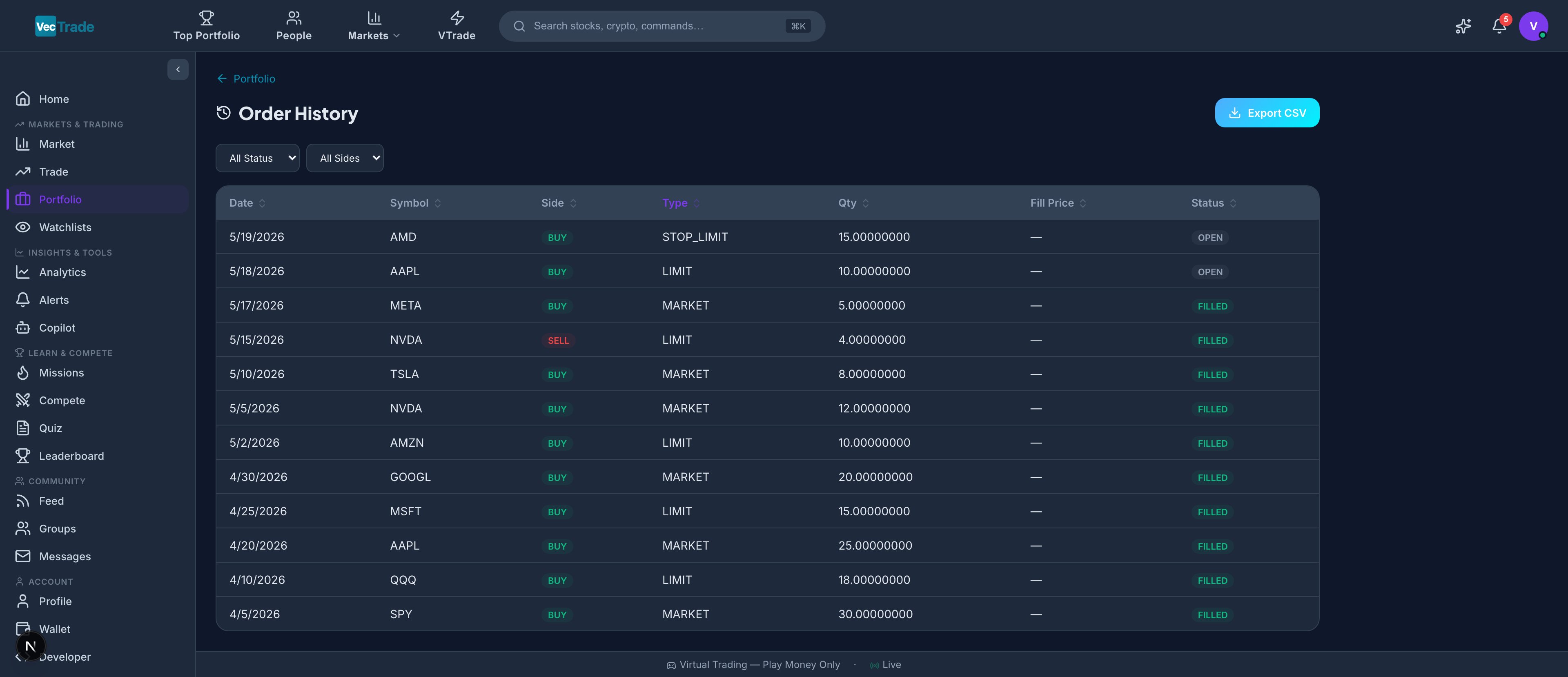
Navigate to **Portfolio → History** for a complete audit trail of every order submitted and executed. This view records every buy, sell, cancellation, and rejection with full execution details.
***
## Portfolio Overview
Navigate to **VTrade → Portfolio** from the left sidebar to access your portfolio dashboard.
### Account Summary Metrics
The top section displays key account-level metrics in real-time:
| Metric | Definition | Update Frequency |
| ---------------------- | ----------------------------------------------------------------------- | ------------------------ |
| **Total Equity** | Sum of all position market values + available cash balance | Real-time (tick-by-tick) |
| **Cash Balance** | Unallocated VCR available for new trades | On trade execution |
| **Day P\&L** | Net profit/loss for the current trading session (unrealized + realized) | Real-time |
| **Unrealized P\&L** | Total mark-to-market gain/loss on open positions | Real-time |
| **Realized P\&L** | Cumulative gain/loss from closed positions (today) | On position close |
| **Margin Utilization** | Percentage of account equity deployed in positions | Real-time |
| **Buying Power** | Maximum capital available for new positions (includes leverage) | Real-time |
A color-coded margin utilization bar provides immediate visual feedback:
* **Green (0–50%)** — Conservative allocation, ample buying power remaining
* **Amber (50–80%)** — Moderate concentration, reduced flexibility
* **Red (80–100%)** — High concentration, approaching position limits
### Positions Table
Below the summary, the positions table displays every open holding with granular detail:
| Column | Description | Sortable |
| -------------------- | ------------------------------------------------------------------ | -------- |
| Symbol | Ticker with exchange badge — clickable (navigates to Trading Desk) | ✓ |
| Instrument Name | Full company/instrument name | ✓ |
| Side | LONG or SHORT with directional indicator | ✓ |
| Quantity | Number of shares/units held | ✓ |
| Average Cost | Volume-weighted average entry price across all fills | ✓ |
| Current Price | Real-time market price (last trade) | ✓ |
| Market Value | Position current value (Qty × Current Price) | ✓ |
| Cost Basis | Position entry value (Qty × Avg. Cost) | ✓ |
| Unrealized P\&L (\$) | Dollar profit/loss (Market Value – Cost Basis) | ✓ |
| Unrealized P\&L (%) | Percentage return on the position | ✓ |
| Day Change (\$) | Dollar change in position value today | ✓ |
| Day Change (%) | Percentage change in position value today | ✓ |
| Weight (%) | Position size as a percentage of total portfolio equity | ✓ |
| Sector | Industry sector classification | ✓ |
**Row Interaction:**
* Click the **expand arrow** (▶) on any position to reveal:
* Complete entry history (individual fills with timestamps and prices)
* Partial close history (any lots already sold)
* Realized P\&L from partially closed lots
* Position-level analytics (beta contribution, sector classification, correlation to benchmark)
* Click the **symbol** to navigate directly to the Trading Desk for that instrument
* Click the **close** (×) icon to initiate a position close order
### Allocation Visualization
Below the positions table, two complementary charts display portfolio composition:
**Sector Allocation (Donut Chart):**
* Each segment represents a GICS sector (Technology, Healthcare, Financials, etc.)
* Segment size proportional to combined position weight
* Hover to see exact percentage and dollar value
* Identifies concentration risk at a glance
**Asset Class Breakdown (Stacked Bar):**
* Horizontal bar split by asset class: Equities, ETFs, Crypto, Forex, Commodities
* Shows relative capital allocation across asset types
***
## Performance Analytics
Switch to the **Performance** tab within Portfolio for comprehensive return analysis.
### Key Performance Indicators
| Metric | Definition | Benchmark Context |
| --------------------- | ------------------------------------------------------------------ | ----------------------------------------- |
| **Total Return (%)** | Cumulative percentage return since account inception | — |
| **Total Return (\$)** | Absolute VCR gain/loss since inception | — |
| **Annualized Return** | Return normalized to annual rate (CAGR) | S\&P 500 avg: \~10% |
| **Sharpe Ratio** | Risk-adjusted return (excess return ÷ volatility) | > 1.0 = acceptable; > 2.0 = excellent |
| **Sortino Ratio** | Downside-risk-adjusted return (penalizes only negative volatility) | > 1.5 = strong |
| **Max Drawdown** | Largest peak-to-trough decline experienced | Lower = better capital preservation |
| **Win Rate** | Percentage of closed trades that were profitable | 50%+ typical for trend-followers |
| **Profit Factor** | Gross profits ÷ gross losses | > 1.5 = sustainable; > 2.0 = strong |
| **Average Win** | Mean profit on winning trades (\$) | — |
| **Average Loss** | Mean loss on losing trades (\$) | — |
| **Expectancy** | (Win Rate × Avg Win) – (Loss Rate × Avg Loss) | Positive = profitable system |
| **Total Trades** | Lifetime closed positions | — |
| **Calmar Ratio** | Annualized return ÷ maximum drawdown | > 1.0 = adequate risk management |
| **Beta** | Portfolio sensitivity to benchmark (S\&P 500) movements | 1.0 = market-matching; \< 1.0 = defensive |
### Monthly Performance Heatmap
A calendar grid displaying monthly returns with color-intensity encoding:
* **Dark green** — Strongly positive month (> +5%)
* **Light green** — Moderately positive month (+1% to +5%)
* **Grey** — Approximately flat (–1% to +1%)
* **Light red** — Moderately negative month (–1% to –5%)
* **Dark red** — Strongly negative month (\< –5%)
Each cell is clickable — selecting a month drills into a day-by-day breakdown for that period.
### Attribution Analysis
Understand where your returns are coming from across multiple dimensions:
**By Asset Class:**
* Equities contribution, ETFs contribution, Crypto contribution, Forex contribution, Commodities contribution
* Shows which asset classes are driving returns vs. dragging performance
**By Sector:**
* Technology, Healthcare, Financials, Energy, Consumer Discretionary, Industrials, etc.
* Identifies sector timing skill (or lack thereof)
**By Direction:**
* Long position returns vs. Short position returns
* Reveals directional bias and effectiveness
**By Time of Day:**
* Morning trades (first 2 hours) vs. Midday vs. Close (last hour)
* Identifies optimal trading windows for your strategy
***
## Trade History
Navigate to **Portfolio → History** for a complete audit trail of every order submitted and executed. This view records every buy, sell, cancellation, and rejection with full execution details.
 ### Transaction Record Table
Each trade entry contains:
| Field | Description |
| ------------- | ------------------------------------------------------------ |
| Date/Time | Precise timestamp of execution (in your configured timezone) |
| Symbol | Instrument ticker and exchange |
| Side | BUY or SELL with color-coded badge |
| Quantity | Number of shares/units filled |
| Fill Price | Average execution price (weighted across partial fills) |
| Total Value | Gross transaction value (Qty × Price) |
| Fee | Commission charged for this execution |
| Net Value | Total Value ± Fee (net debit or net credit) |
| Order Type | Market, Limit, Stop, Stop-Limit, Trailing, Bracket, OCO |
| Time-in-Force | DAY, GTC, IOC, FOK, GTD |
| Status | Filled, Partially Filled, Cancelled, Rejected, Expired |
| Order ID | Unique identifier for reference |
### Advanced Filtering
The filter toolbar supports multi-dimensional queries:
| Filter | Options |
| ----------------- | --------------------------------------------------------------------------------- |
| **Date Range** | Today, This Week, This Month, This Quarter, YTD, Last 30/60/90 Days, Custom Range |
| **Symbol** | Free-text search (supports partial match) |
| **Side** | All, Buy Only, Sell Only |
| **Order Type** | All, Market, Limit, Stop, Stop-Limit, Trailing, Bracket, OCO |
| **Status** | All, Filled, Partially Filled, Cancelled, Rejected, Expired |
| **Asset Class** | All, Equities, ETFs, Crypto, Forex, Commodities |
| **Min/Max Value** | Filter by transaction size |
### Export Capabilities
Click **Export CSV** to download your filtered trade history as a comma-separated file compatible with:
* Microsoft Excel / Google Sheets
* TradingView import
* Third-party portfolio trackers
* Tax preparation software
* Custom analysis scripts
The export includes all visible columns plus additional metadata (order submission time, cancellation reason if applicable, fill venue).
***
## Portfolio Snapshots
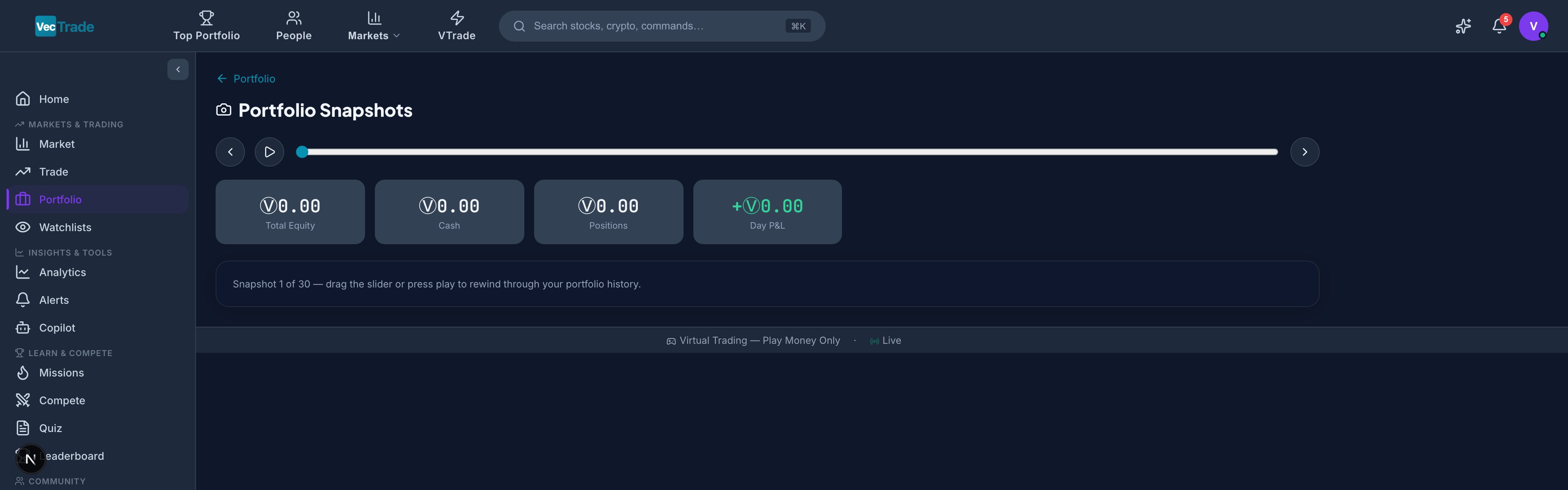
Navigate to **Portfolio → Snapshots** for time-series visualization of your portfolio evolution. The equity curve is the most important single chart in portfolio management — it tells the story of your cumulative trading performance over time.
### Transaction Record Table
Each trade entry contains:
| Field | Description |
| ------------- | ------------------------------------------------------------ |
| Date/Time | Precise timestamp of execution (in your configured timezone) |
| Symbol | Instrument ticker and exchange |
| Side | BUY or SELL with color-coded badge |
| Quantity | Number of shares/units filled |
| Fill Price | Average execution price (weighted across partial fills) |
| Total Value | Gross transaction value (Qty × Price) |
| Fee | Commission charged for this execution |
| Net Value | Total Value ± Fee (net debit or net credit) |
| Order Type | Market, Limit, Stop, Stop-Limit, Trailing, Bracket, OCO |
| Time-in-Force | DAY, GTC, IOC, FOK, GTD |
| Status | Filled, Partially Filled, Cancelled, Rejected, Expired |
| Order ID | Unique identifier for reference |
### Advanced Filtering
The filter toolbar supports multi-dimensional queries:
| Filter | Options |
| ----------------- | --------------------------------------------------------------------------------- |
| **Date Range** | Today, This Week, This Month, This Quarter, YTD, Last 30/60/90 Days, Custom Range |
| **Symbol** | Free-text search (supports partial match) |
| **Side** | All, Buy Only, Sell Only |
| **Order Type** | All, Market, Limit, Stop, Stop-Limit, Trailing, Bracket, OCO |
| **Status** | All, Filled, Partially Filled, Cancelled, Rejected, Expired |
| **Asset Class** | All, Equities, ETFs, Crypto, Forex, Commodities |
| **Min/Max Value** | Filter by transaction size |
### Export Capabilities
Click **Export CSV** to download your filtered trade history as a comma-separated file compatible with:
* Microsoft Excel / Google Sheets
* TradingView import
* Third-party portfolio trackers
* Tax preparation software
* Custom analysis scripts
The export includes all visible columns plus additional metadata (order submission time, cancellation reason if applicable, fill venue).
***
## Portfolio Snapshots
Navigate to **Portfolio → Snapshots** for time-series visualization of your portfolio evolution. The equity curve is the most important single chart in portfolio management — it tells the story of your cumulative trading performance over time.
 ### Equity Curve
VTrade captures an end-of-day snapshot of your total portfolio value every trading day. These snapshots form your equity curve — the most important visual representation of your trading performance over time.
**Timeframe Selector:**
* 1 Week (5 trading days)
* 1 Month (21 trading days)
* 3 Months (63 trading days)
* 6 Months (126 trading days)
* 1 Year (252 trading days)
* All Time (since account creation)
**Curve Features:**
* Line chart with area fill showing cumulative portfolio value
* Benchmark overlay (S\&P 500 total return) for relative performance comparison
* Drawdown shading — periods where portfolio was below its previous all-time high are highlighted in translucent red
* High-water mark line — horizontal line at the portfolio's peak value
### Period-Specific Risk Metrics
For each selected timeframe, a metrics panel displays:
| Metric | Description |
| --------------------- | ----------------------------------------------- |
| Period Return (%) | Gain/loss for the selected window |
| Annualized Volatility | Standard deviation of daily returns, annualized |
| Sharpe Ratio | Risk-adjusted return for the period |
| Maximum Drawdown | Worst peak-to-trough decline in the period |
| Recovery Time | Days from max drawdown trough back to breakeven |
| Value-at-Risk (95%) | Maximum expected daily loss at 95% confidence |
| Beta | Correlation-adjusted sensitivity to S\&P 500 |
| Tracking Error | Volatility of returns relative to benchmark |
***
## Wallet
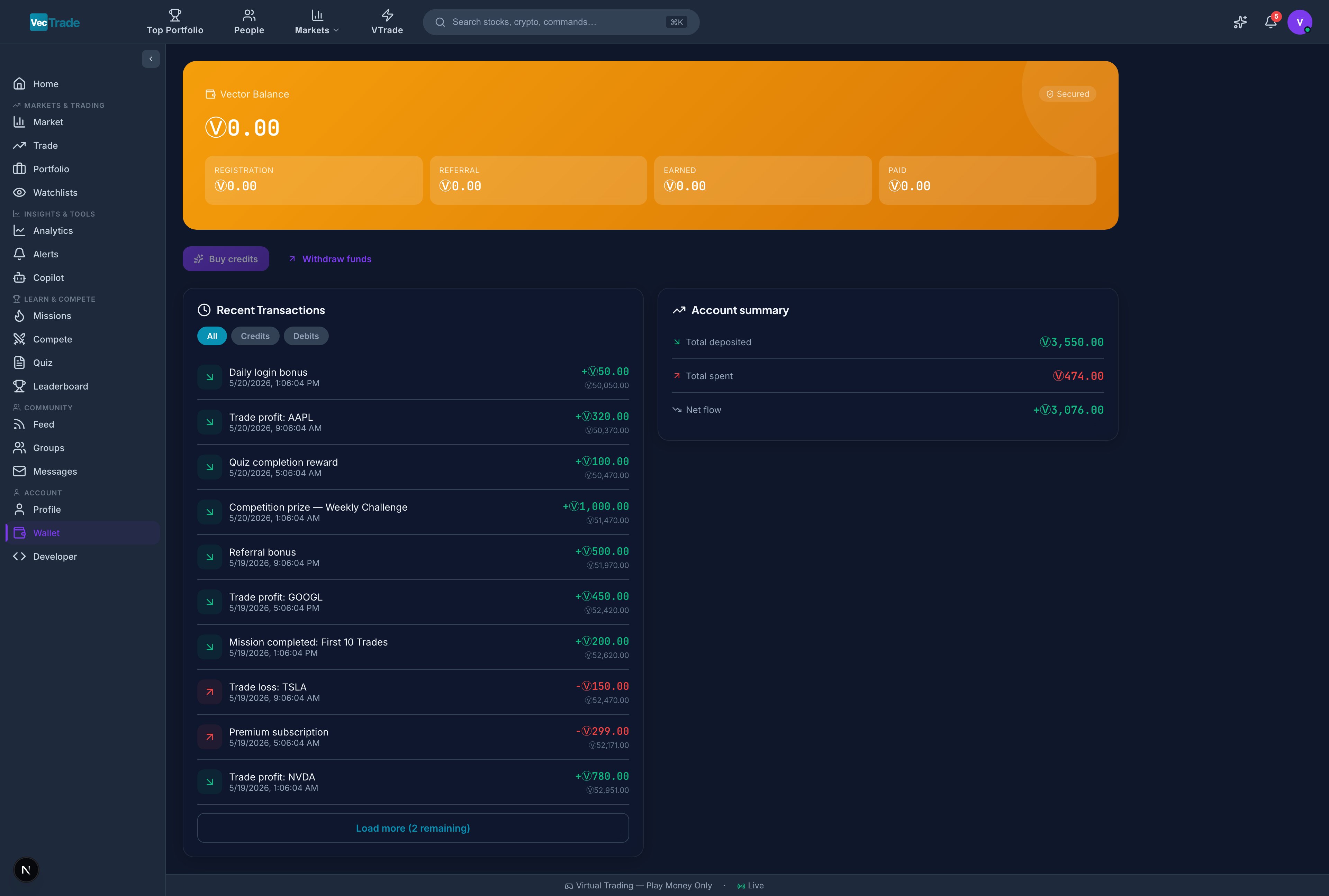
The Wallet tracks your VCR (VecTrade Virtual Currency) balance and provides a complete financial ledger of all credits and debits — including trading activity, commission fees, and rewards earned from competitions, missions, and referrals.
### Equity Curve
VTrade captures an end-of-day snapshot of your total portfolio value every trading day. These snapshots form your equity curve — the most important visual representation of your trading performance over time.
**Timeframe Selector:**
* 1 Week (5 trading days)
* 1 Month (21 trading days)
* 3 Months (63 trading days)
* 6 Months (126 trading days)
* 1 Year (252 trading days)
* All Time (since account creation)
**Curve Features:**
* Line chart with area fill showing cumulative portfolio value
* Benchmark overlay (S\&P 500 total return) for relative performance comparison
* Drawdown shading — periods where portfolio was below its previous all-time high are highlighted in translucent red
* High-water mark line — horizontal line at the portfolio's peak value
### Period-Specific Risk Metrics
For each selected timeframe, a metrics panel displays:
| Metric | Description |
| --------------------- | ----------------------------------------------- |
| Period Return (%) | Gain/loss for the selected window |
| Annualized Volatility | Standard deviation of daily returns, annualized |
| Sharpe Ratio | Risk-adjusted return for the period |
| Maximum Drawdown | Worst peak-to-trough decline in the period |
| Recovery Time | Days from max drawdown trough back to breakeven |
| Value-at-Risk (95%) | Maximum expected daily loss at 95% confidence |
| Beta | Correlation-adjusted sensitivity to S\&P 500 |
| Tracking Error | Volatility of returns relative to benchmark |
***
## Wallet
The Wallet tracks your VCR (VecTrade Virtual Currency) balance and provides a complete financial ledger of all credits and debits — including trading activity, commission fees, and rewards earned from competitions, missions, and referrals.
 ### Balance Display
A prominent card shows your current VCR balance with:
* **Available Balance** — Funds free to deploy in new positions
* **Reserved (In Orders)** — Funds allocated to pending/working orders
* **Total Account Value** — Available + Reserved + Position Market Values
### Transaction Ledger
A chronological log of every wallet movement:
| Transaction Type | Direction | Description |
| --------------------- | --------- | ------------------------------------------------ |
| **Trade Purchase** | Debit | VCR spent to acquire an asset (including fees) |
| **Trade Sale** | Credit | VCR received from selling a position |
| **Commission Fee** | Debit | Trading fee deducted per the fee schedule |
| **Initial Deposit** | Credit | Starting capital (10,000 VCR at registration) |
| **Competition Prize** | Credit | VCR awarded for competition placement |
| **Achievement Bonus** | Credit | VCR reward for unlocking a badge/milestone |
| **Mission Reward** | Credit | VCR earned from completing daily/weekly missions |
| **Referral Bonus** | Credit | VCR earned when a referred user completes signup |
| **Quiz Reward** | Credit | VCR bonus for consecutive correct quiz answers |
| **Level-Up Bonus** | Credit | VCR awarded upon reaching a new XP level |
Each entry displays: timestamp, type, amount (+/–), running balance, and reference ID.
### Filtering Options
| Filter | Description |
| ---------------- | ----------------------------------------------- |
| **All** | Complete transaction history |
| **Credits Only** | Incoming funds (sales, rewards, bonuses) |
| **Debits Only** | Outgoing funds (purchases, fees) |
| **Trading Only** | Buy/sell/fee transactions only |
| **Rewards Only** | Competitions, achievements, missions, referrals |
Transactions load in paginated batches of 20. Click **Load More** to retrieve older entries.
### Account Summary Panel
A consolidated financial overview:
| Category | Description |
| ----------------------------- | ------------------------------------------------------------- |
| **Total Credited (Lifetime)** | All VCR ever received (deposits + rewards + sales) |
| **Total Debited (Lifetime)** | All VCR ever spent (purchases + fees) |
| **Net Trading P\&L** | Total sale proceeds – Total purchase costs – Total fees |
| **Total Rewards Earned** | Sum of all non-trading credits (competitions, missions, etc.) |
| **Total Fees Paid** | Cumulative trading commissions |
***
## Watchlists
Watchlists allow you to organize and monitor instruments of interest without holding a position. They serve as your research pipeline — tracking candidates for potential trades, monitoring sector leaders, and receiving automated alerts when conditions are met.
### Balance Display
A prominent card shows your current VCR balance with:
* **Available Balance** — Funds free to deploy in new positions
* **Reserved (In Orders)** — Funds allocated to pending/working orders
* **Total Account Value** — Available + Reserved + Position Market Values
### Transaction Ledger
A chronological log of every wallet movement:
| Transaction Type | Direction | Description |
| --------------------- | --------- | ------------------------------------------------ |
| **Trade Purchase** | Debit | VCR spent to acquire an asset (including fees) |
| **Trade Sale** | Credit | VCR received from selling a position |
| **Commission Fee** | Debit | Trading fee deducted per the fee schedule |
| **Initial Deposit** | Credit | Starting capital (10,000 VCR at registration) |
| **Competition Prize** | Credit | VCR awarded for competition placement |
| **Achievement Bonus** | Credit | VCR reward for unlocking a badge/milestone |
| **Mission Reward** | Credit | VCR earned from completing daily/weekly missions |
| **Referral Bonus** | Credit | VCR earned when a referred user completes signup |
| **Quiz Reward** | Credit | VCR bonus for consecutive correct quiz answers |
| **Level-Up Bonus** | Credit | VCR awarded upon reaching a new XP level |
Each entry displays: timestamp, type, amount (+/–), running balance, and reference ID.
### Filtering Options
| Filter | Description |
| ---------------- | ----------------------------------------------- |
| **All** | Complete transaction history |
| **Credits Only** | Incoming funds (sales, rewards, bonuses) |
| **Debits Only** | Outgoing funds (purchases, fees) |
| **Trading Only** | Buy/sell/fee transactions only |
| **Rewards Only** | Competitions, achievements, missions, referrals |
Transactions load in paginated batches of 20. Click **Load More** to retrieve older entries.
### Account Summary Panel
A consolidated financial overview:
| Category | Description |
| ----------------------------- | ------------------------------------------------------------- |
| **Total Credited (Lifetime)** | All VCR ever received (deposits + rewards + sales) |
| **Total Debited (Lifetime)** | All VCR ever spent (purchases + fees) |
| **Net Trading P\&L** | Total sale proceeds – Total purchase costs – Total fees |
| **Total Rewards Earned** | Sum of all non-trading credits (competitions, missions, etc.) |
| **Total Fees Paid** | Cumulative trading commissions |
***
## Watchlists
Watchlists allow you to organize and monitor instruments of interest without holding a position. They serve as your research pipeline — tracking candidates for potential trades, monitoring sector leaders, and receiving automated alerts when conditions are met.
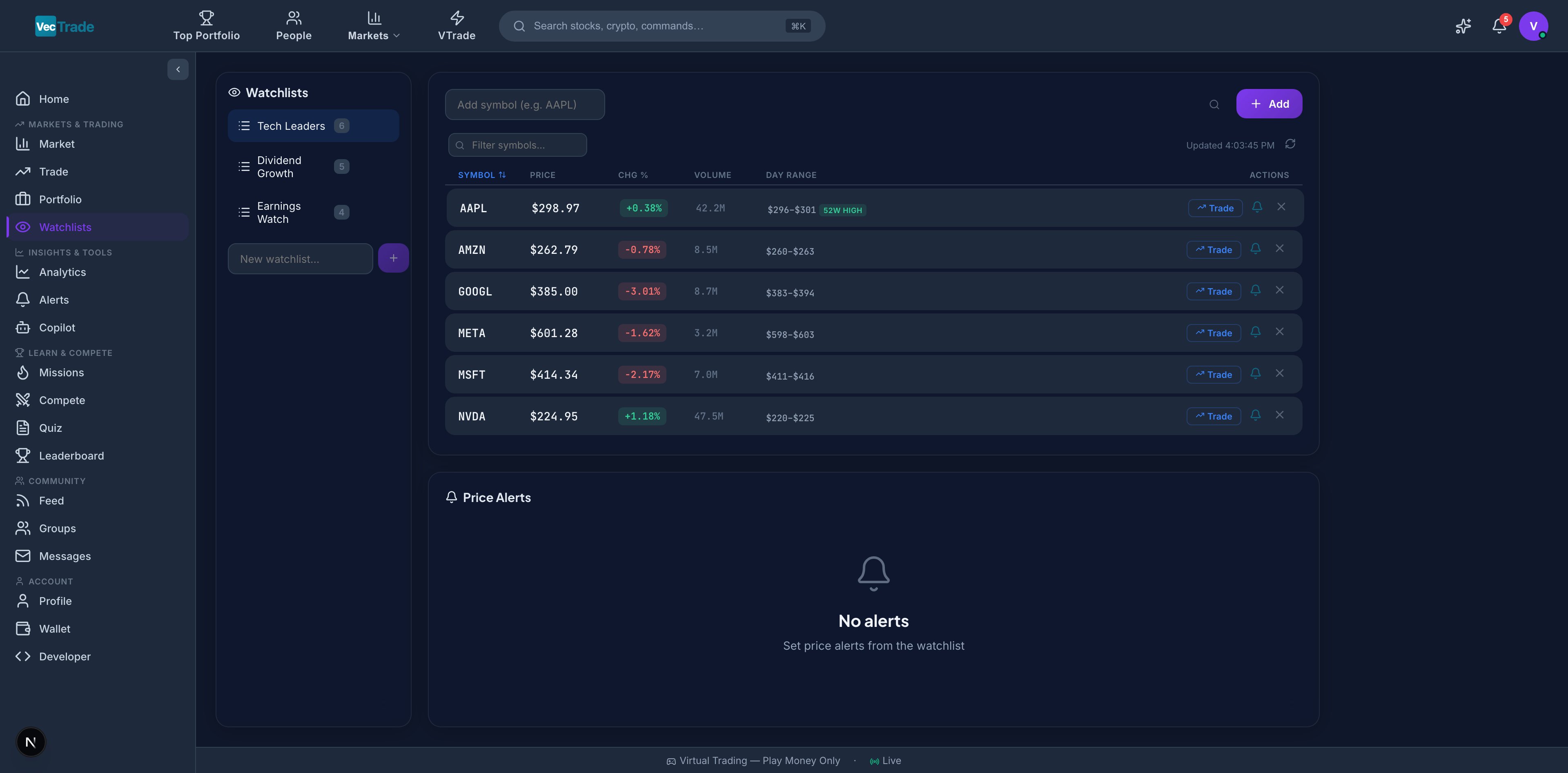 ### Creating and Managing Watchlists
**To create a new watchlist:**
1. Navigate to **VTrade → Watchlists**
2. Click **+ New Watchlist** in the left sidebar panel
3. Enter a descriptive name (e.g., "AI Semiconductor Plays", "Earnings This Week", "Dividend Aristocrats")
4. The empty list is created — now add instruments
**To add instruments:**
* Click **+ Add Symbol** at the top of the watchlist
* Search by ticker or company name
* Click the result to add it to the active list
* Alternative: from any stock page or search result, click the watchlist icon (☆) and select the target list
**To remove instruments:**
* Click the × icon on any row to remove it from the list
* Or right-click → Remove from Watchlist
**To rename or delete a watchlist:**
* Right-click the watchlist name in the sidebar → Rename or Delete
### Watchlist Data Columns
Each instrument in a watchlist displays live data refreshing every 30 seconds:
| Column | Description | Sortable |
| -------------- | ------------------------------------------ | -------- |
| Symbol | Ticker with exchange badge | ✓ |
| Name | Full instrument name | ✓ |
| Price | Current market price (last trade) | ✓ |
| Change (\$) | Dollar change from previous close | ✓ |
| Change (%) | Percentage change from previous close | ✓ |
| Volume | Shares traded today | ✓ |
| Avg. Volume | 20-day average volume | ✓ |
| Market Cap | Total market capitalization | ✓ |
| 52-Week Range | Visual progress bar (low → current → high) | — |
| P/E Ratio | Price-to-earnings (trailing twelve months) | ✓ |
| Dividend Yield | Annual dividend as % of price | ✓ |
### 52-Week Proximity Badges
Automatic visual indicators appear when price approaches extremes:
| Badge | Condition | Significance |
| --------------- | ------------------------------------------ | ---------------------------------------------------- |
| 🟢 **52W HIGH** | Current price is within 3% of 52-week high | Potential breakout candidate or momentum strength |
| 🔴 **52W LOW** | Current price is within 3% of 52-week low | Potential value opportunity or further downside risk |
### Quick Actions
Each watchlist row provides single-click actions:
* **Trade** — Navigate directly to the Trading Desk with this symbol loaded
* **Chart** — Open a full-screen chart view
* **Copilot** — Ask AI for a quick analysis of this instrument
* **Alert** — Configure a price alert (detailed below)
### Price Alert System
Click the **bell icon** (🔔) on any watchlist row to configure automated price notifications:
| Alert Type | Configuration | Trigger Condition |
| ----------------------- | --------------------------------------------- | ------------------------------------------------------------- |
| **Price Above** | Set a target price | Triggers when last trade ≥ target price |
| **Price Below** | Set a floor price | Triggers when last trade ≤ floor price |
| **Percentage Gain** | Set % threshold from current price | Triggers when cumulative gain from alert creation ≥ threshold |
| **Percentage Drop** | Set % threshold from current price | Triggers when cumulative loss from alert creation ≥ threshold |
| **Trailing Stop Alert** | Set trail % from highest price since creation | Triggers when price declines by trail % from its peak |
| **Volume Spike** | Set multiplier (e.g., 2× average) | Triggers when daily volume exceeds multiplier × 20-day avg |
**Alert Lifecycle:**
1. **Active** — Monitoring (shown with blue bell icon)
2. **Triggered** — Condition met (shows "Triggered" badge with timestamp)
3. **Expired** — If configured with an expiry date that has passed
**Notification Delivery:**
When an alert triggers, you receive:
* In-app notification (bell icon in the top navigation bar)
* Email notification (if enabled in Settings → Notifications)
* Push notification (if enabled in Settings → Notifications)
Combine watchlists with price alerts to create a systematic "shopping list" workflow. Add stocks at their fair value estimate, set alerts at your target entry prices, and let the platform notify you when opportunities arise — rather than constantly monitoring prices manually.
### Multiple Watchlists Strategy
Professional traders typically maintain several watchlists organized by purpose:
| Watchlist Name | Purpose | Example Contents |
| --------------------- | ------------------------------------------------- | ------------------ |
| "Active Trades" | Instruments I currently hold or am about to trade | AAPL, NVDA, TSLA |
| "Earnings Queue" | Stocks reporting earnings this week | MSFT, GOOGL, META |
| "Technical Setups" | Instruments forming actionable chart patterns | AMD, AMZN, NFLX |
| "Dividend Candidates" | Income-generating opportunities under review | JNJ, PG, KO |
| "Sector Rotation" | ETFs for tracking sector momentum | XLK, XLF, XLE, XLV |
### Creating and Managing Watchlists
**To create a new watchlist:**
1. Navigate to **VTrade → Watchlists**
2. Click **+ New Watchlist** in the left sidebar panel
3. Enter a descriptive name (e.g., "AI Semiconductor Plays", "Earnings This Week", "Dividend Aristocrats")
4. The empty list is created — now add instruments
**To add instruments:**
* Click **+ Add Symbol** at the top of the watchlist
* Search by ticker or company name
* Click the result to add it to the active list
* Alternative: from any stock page or search result, click the watchlist icon (☆) and select the target list
**To remove instruments:**
* Click the × icon on any row to remove it from the list
* Or right-click → Remove from Watchlist
**To rename or delete a watchlist:**
* Right-click the watchlist name in the sidebar → Rename or Delete
### Watchlist Data Columns
Each instrument in a watchlist displays live data refreshing every 30 seconds:
| Column | Description | Sortable |
| -------------- | ------------------------------------------ | -------- |
| Symbol | Ticker with exchange badge | ✓ |
| Name | Full instrument name | ✓ |
| Price | Current market price (last trade) | ✓ |
| Change (\$) | Dollar change from previous close | ✓ |
| Change (%) | Percentage change from previous close | ✓ |
| Volume | Shares traded today | ✓ |
| Avg. Volume | 20-day average volume | ✓ |
| Market Cap | Total market capitalization | ✓ |
| 52-Week Range | Visual progress bar (low → current → high) | — |
| P/E Ratio | Price-to-earnings (trailing twelve months) | ✓ |
| Dividend Yield | Annual dividend as % of price | ✓ |
### 52-Week Proximity Badges
Automatic visual indicators appear when price approaches extremes:
| Badge | Condition | Significance |
| --------------- | ------------------------------------------ | ---------------------------------------------------- |
| 🟢 **52W HIGH** | Current price is within 3% of 52-week high | Potential breakout candidate or momentum strength |
| 🔴 **52W LOW** | Current price is within 3% of 52-week low | Potential value opportunity or further downside risk |
### Quick Actions
Each watchlist row provides single-click actions:
* **Trade** — Navigate directly to the Trading Desk with this symbol loaded
* **Chart** — Open a full-screen chart view
* **Copilot** — Ask AI for a quick analysis of this instrument
* **Alert** — Configure a price alert (detailed below)
### Price Alert System
Click the **bell icon** (🔔) on any watchlist row to configure automated price notifications:
| Alert Type | Configuration | Trigger Condition |
| ----------------------- | --------------------------------------------- | ------------------------------------------------------------- |
| **Price Above** | Set a target price | Triggers when last trade ≥ target price |
| **Price Below** | Set a floor price | Triggers when last trade ≤ floor price |
| **Percentage Gain** | Set % threshold from current price | Triggers when cumulative gain from alert creation ≥ threshold |
| **Percentage Drop** | Set % threshold from current price | Triggers when cumulative loss from alert creation ≥ threshold |
| **Trailing Stop Alert** | Set trail % from highest price since creation | Triggers when price declines by trail % from its peak |
| **Volume Spike** | Set multiplier (e.g., 2× average) | Triggers when daily volume exceeds multiplier × 20-day avg |
**Alert Lifecycle:**
1. **Active** — Monitoring (shown with blue bell icon)
2. **Triggered** — Condition met (shows "Triggered" badge with timestamp)
3. **Expired** — If configured with an expiry date that has passed
**Notification Delivery:**
When an alert triggers, you receive:
* In-app notification (bell icon in the top navigation bar)
* Email notification (if enabled in Settings → Notifications)
* Push notification (if enabled in Settings → Notifications)
Combine watchlists with price alerts to create a systematic "shopping list" workflow. Add stocks at their fair value estimate, set alerts at your target entry prices, and let the platform notify you when opportunities arise — rather than constantly monitoring prices manually.
### Multiple Watchlists Strategy
Professional traders typically maintain several watchlists organized by purpose:
| Watchlist Name | Purpose | Example Contents |
| --------------------- | ------------------------------------------------- | ------------------ |
| "Active Trades" | Instruments I currently hold or am about to trade | AAPL, NVDA, TSLA |
| "Earnings Queue" | Stocks reporting earnings this week | MSFT, GOOGL, META |
| "Technical Setups" | Instruments forming actionable chart patterns | AMD, AMZN, NFLX |
| "Dividend Candidates" | Income-generating opportunities under review | JNJ, PG, KO |
| "Sector Rotation" | ETFs for tracking sector momentum | XLK, XLF, XLE, XLV |