

Welcome to VTrade
VTrade is a professional paper trading simulator designed to replicate real-world market conditions with high fidelity. Whether you are a first-time investor learning the fundamentals of order execution, an intermediate trader refining risk management strategies, or an experienced professional backtesting new approaches, VTrade provides the tools, data, and community to accelerate your growth — all without risking real capital.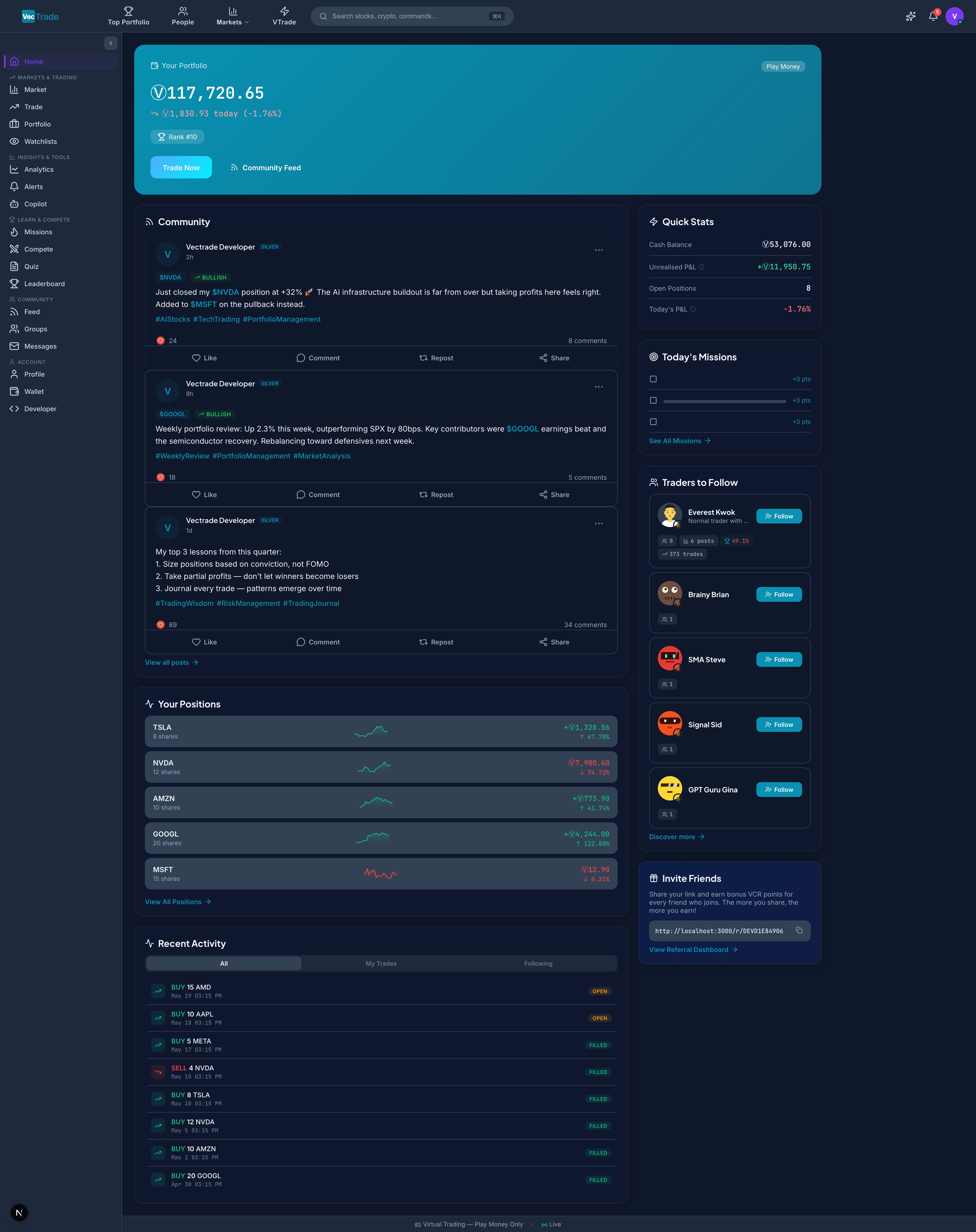
Simulation Philosophy
VTrade is built on the principle that effective trading education requires realistic market conditions. Unlike simplified stock games that execute instantly at quoted prices, VTrade models the frictions and complexities that impact real portfolio outcomes:
This approach ensures that strategies developed on VTrade translate directly to live market execution — eliminating the false confidence that frictionless simulators create.
Platform Capabilities
Multi-Asset Trading Engine
Execute market, limit, stop, and stop-limit orders across equities, ETFs, cryptocurrencies, foreign exchange, commodities, and indices. Orders process against live market data with configurable slippage simulation, realistic commission structures, and partial fill modeling.
Portfolio Intelligence
Monitor real-time portfolio valuation, sector allocation, unrealized and realized P&L, position-level attribution, trade history with advanced filtering, equity curve visualization, and automated performance snapshots.
Comprehensive Market Data
Access 160+ tradable instruments across six asset classes. Research individual securities with 8 dedicated analysis tabs — including financials, options chains, insider ownership, SEC filings, and seasonal patterns.
AI-Powered Copilot
Interact with a conversational AI assistant equipped with 48 specialized tools for live data retrieval, technical and fundamental analysis, portfolio diagnostics, stock screening, and autonomous trade execution with user confirmation.
Social Trading & Competitions
Participate in ranked leaderboards, join or create trading groups, enter time-limited competitions with varying rulesets, publish trade ideas, and build a public track record within the community.
Developer API Access
Generate API keys for programmatic access to market data, order execution, and portfolio management. Build automated strategies, custom dashboards, and integration workflows.
Getting Started
Step 1 — Account Registration
Navigate to vectrade.io/register and complete the registration form. Upon account creation, your wallet is automatically credited with 10,000 VCR (VecTrade Virtual Currency) — this is your starting capital for simulated trading. Registration requires:
Post-Registration Account State:
- Wallet: 10,000 VCR available
- Level: Rookie (Level 1)
- Positions: None (empty portfolio)
- Watchlists: 1 default empty watchlist created
- Copilot: Not available (upgrade to Standard for AI access)
Step 2 — Explore the Platform
After email verification and logging in, you land on the VTrade Dashboard. From here you can:- Explore the Market — Browse available instruments across all asset classes
- Configure Settings — Set your preferred language, timezone, theme, and accent colour
- Execute Your First Trade — Head to the Trading Desk to place your first order
Step 3 — Market Familiarization
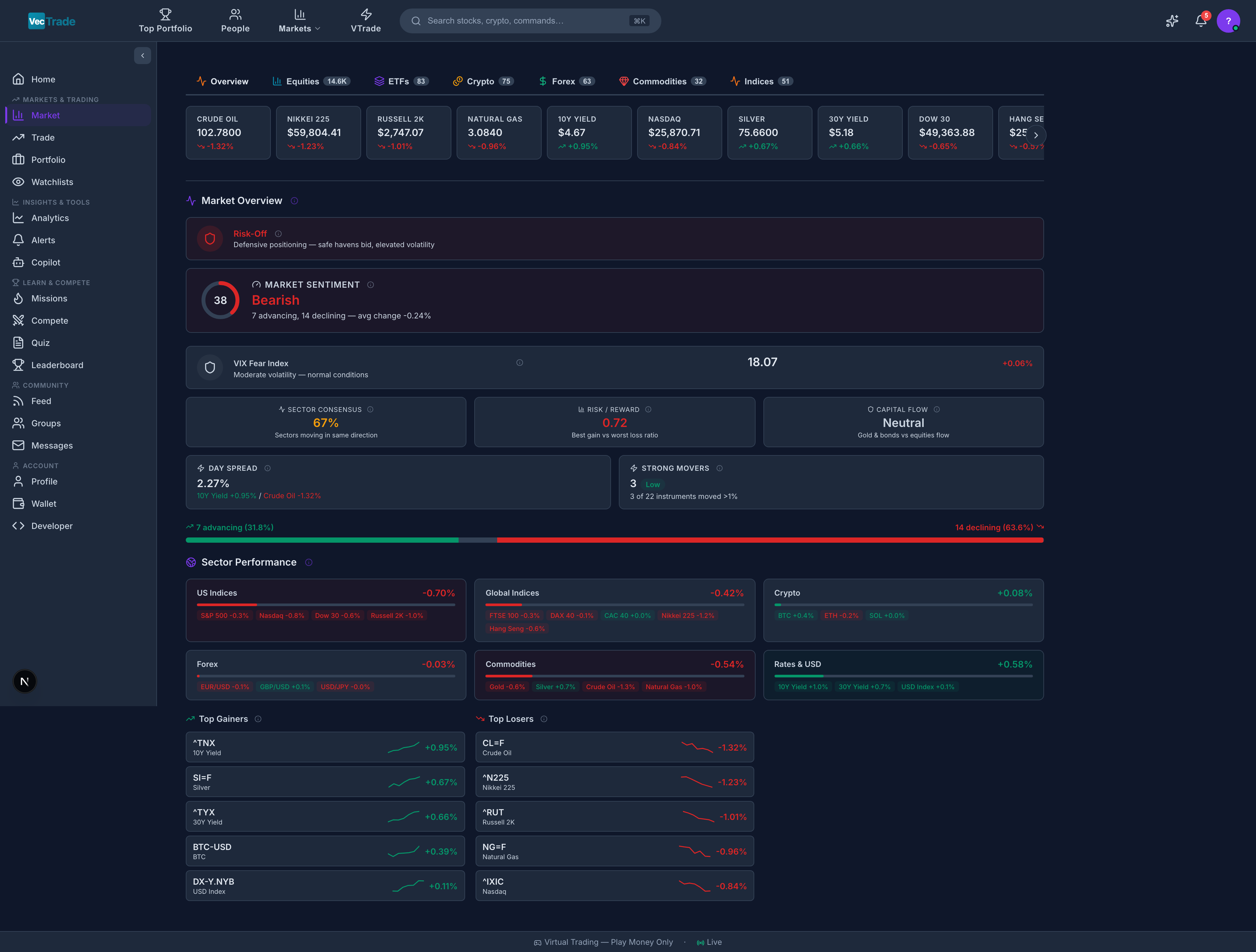
Step 4 — Execute Your First Trade
- Open the Trading Desk from the sidebar
- Type a ticker symbol (e.g.,
AAPL) into the search field - Review the live chart and current market price
- Click Buy, enter a quantity, and select Market Order
- Review the cost breakdown (estimated fill price + fees) in the preview panel
- Click Submit Order — your position is now live
Step 5 — Monitor and Iterate
Return to your Portfolio to observe real-time P&L on your positions. Use the Analytics section to review risk metrics, and check the Leaderboard to see how your returns compare against the community.Dashboard Walkthrough
Hero Section (Top)
The full-width hero card presents your account summary:- Total Portfolio Value — Combined value of all open positions plus available cash, displayed as a large headline figure
- Daily P&L — Today’s profit or loss in both absolute (VCR) and percentage terms, with green/red color coding
- Trading Streak — Consecutive days of trading activity (resets if you miss a day)
- Leaderboard Rank — Your current global position (e.g., “#42 of 15,000 traders”)
- Quick-Action Buttons — One-click shortcuts to Start Trading and View Feed
Main Content Area (Center)
- Top Positions Grid — Your 4–6 largest holdings displayed as cards, each showing symbol, current price, change %, sparkline chart (7-day price movement), and unrealized P&L
- Activity Feed — A chronological stream combining your recent trades, order fills, badge unlocks, and posts from traders you follow. Each entry is timestamped and actionable (click to navigate)
Sidebar (Right)
- Account Metrics — Cash balance, total unrealized P&L, number of open positions, today’s net return %
- Daily Missions Panel — 3–5 active challenges with progress bars showing completion percentage
- Discover People — Algorithm-curated suggestions of traders to follow based on your style and performance
- Referral Card — Your unique invite link with a counter showing successful referrals and earned bonuses
Navigation Bar (Left Sidebar)
Persistent vertical navigation providing single-click access to all major sections:- Dashboard (Home)
- Trading Desk
- Portfolio
- Market
- Analytics
- Copilot
- Social (Feed, Groups, Leaderboard, Competitions, Messages)
- Developer Portal
- Settings
Gamification & Progression System
VTrade integrates a structured progression system designed to encourage consistent engagement, reward skill development, and provide measurable milestones for improvement.Mission System
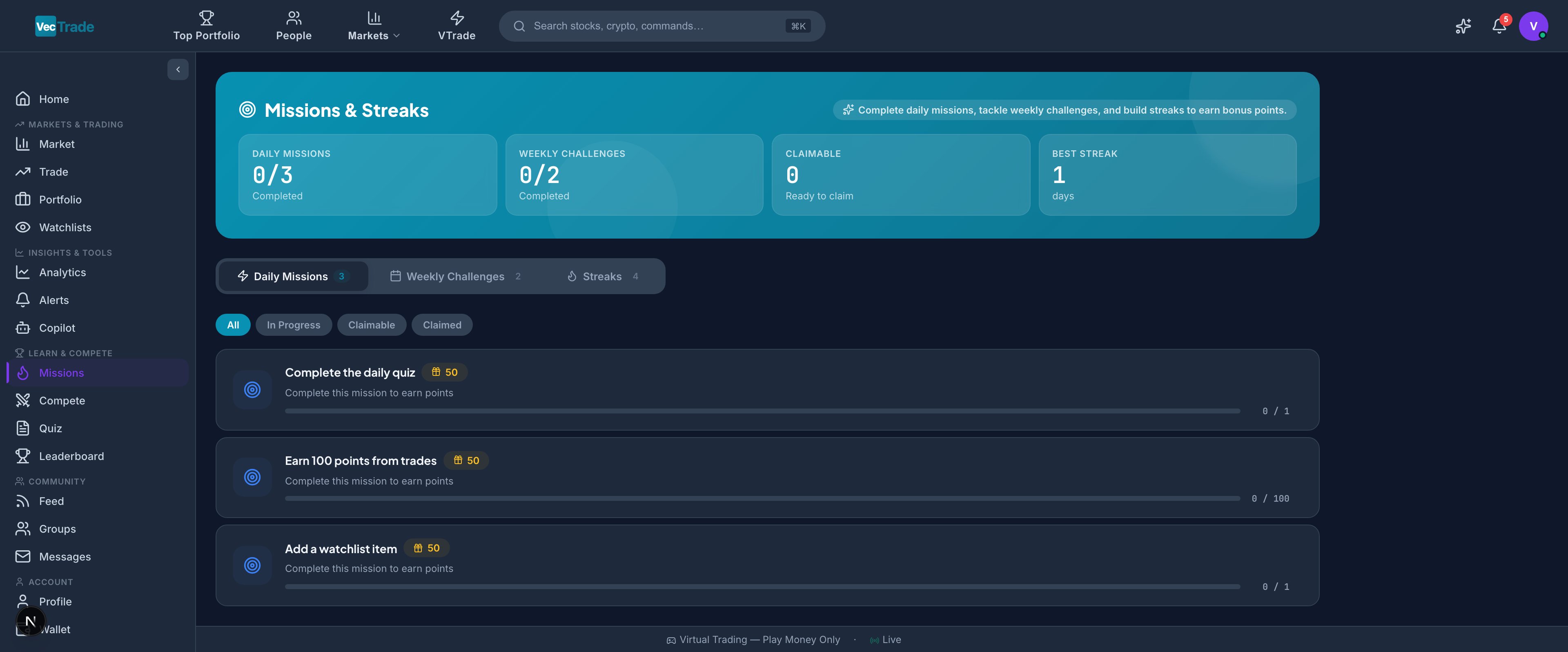
- Execute a specified number of trades (e.g., “Place 3 trades today”)
- Research a security using the analytics tools (e.g., “View the financials tab for any stock”)
- Engage with the community (e.g., “Like or comment on 2 posts”)
- Use a specific feature (e.g., “Ask Copilot a question”)
- Achieve portfolio growth targets (e.g., “+5% portfolio return this week”)
- Diversification goals (e.g., “Hold positions in 3 different sectors”)
- Social engagement (e.g., “Publish a trade idea post”)
- Education milestones (e.g., “Complete 5 daily quizzes”)
Knowledge Quiz
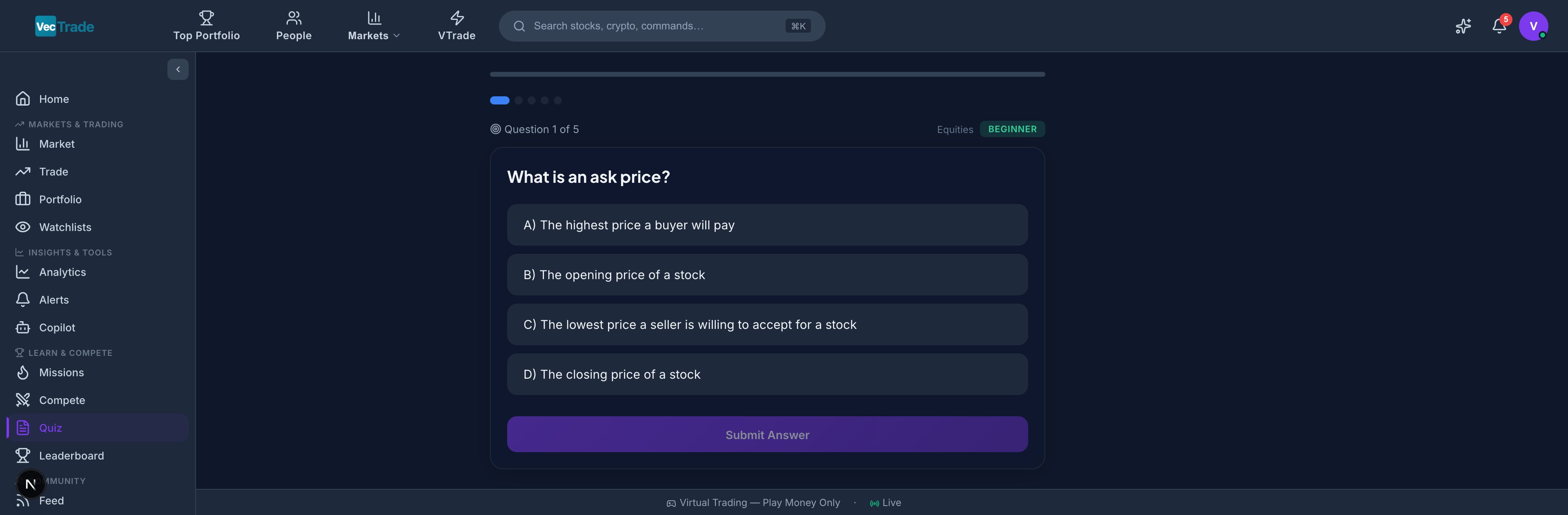
Correct answers award XP. Streaks of consecutive correct answers trigger bonus multipliers.
Experience Levels & Progression
As you accumulate XP through trading activity, missions, quizzes, and community participation, you advance through a tiered progression system:
Your level badge displays next to your name across all social surfaces (leaderboard, feed, groups, messages).
Achievement Badges
Badges are permanent recognitions unlocked by reaching specific milestones:
Badges are showcased on your public profile and appear as flair on leaderboard entries.
Platform Navigation Reference
System Requirements & Compatibility
VTrade is a web-based platform accessible from any modern browser. For optimal performance:
Mobile responsive design supports tablets and smartphones, though the full trading desk experience is optimized for desktop viewports.