Documentation Index

Fetch the complete documentation index at: https://docs.vectrade.io/llms.txt

Use this file to discover all available pages before exploring further.

AI Copilot

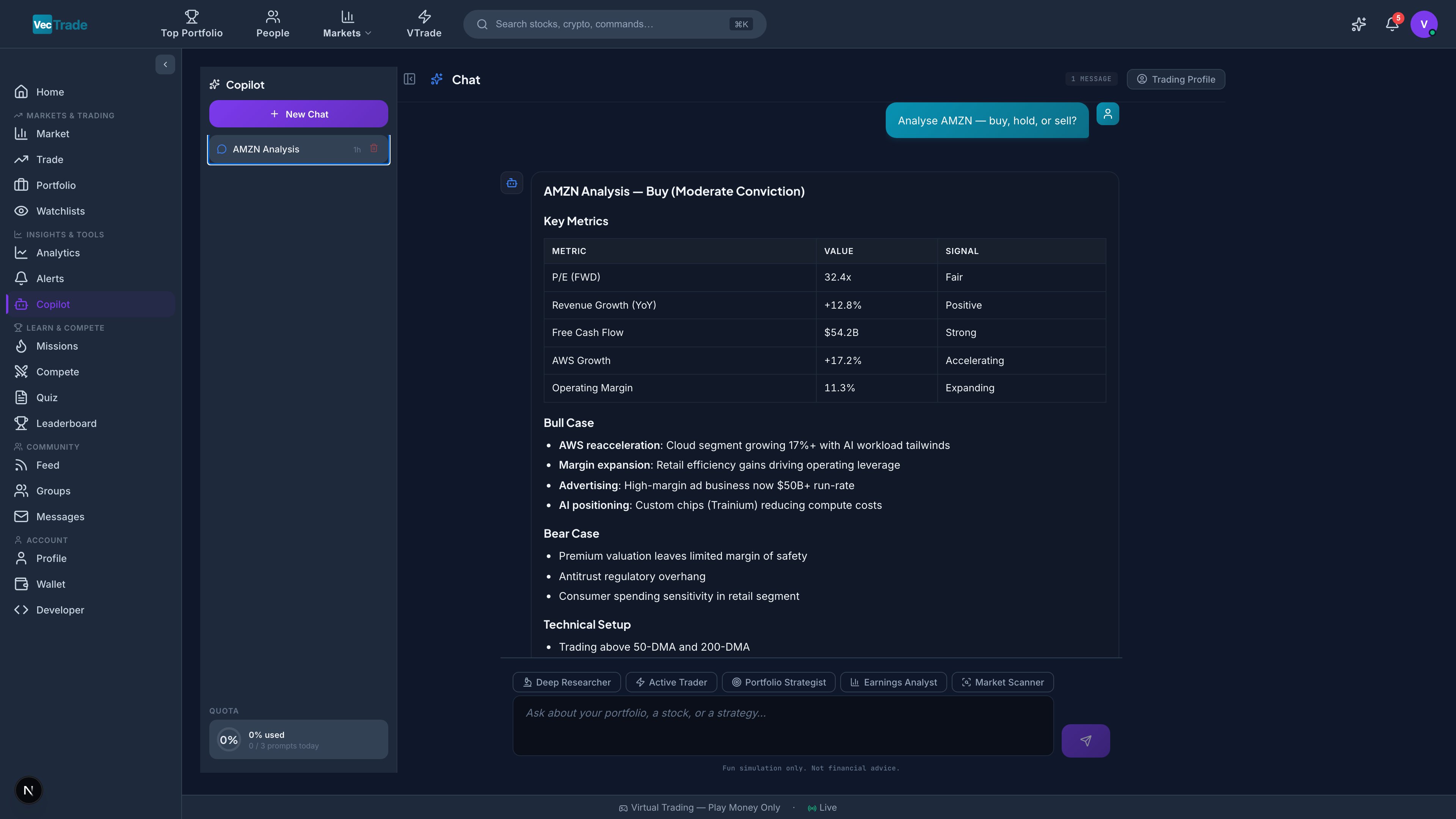
VTrade Copilot is an AI-powered conversational trading assistant that combines large language model reasoning with real-time market data access. It functions as your personal research analyst, portfolio manager, and trading desk — accessible through a natural language chat interface. Copilot has access to 59 specialized tools spanning market data retrieval, fundamental analysis, technical analysis, portfolio diagnostics, stock screening, and autonomous order execution. You interact in plain language; Copilot determines which tools to invoke, retrieves the necessary data, synthesizes the results, and delivers actionable intelligence. Copilot Chat — Active conversation showing tool execution, market analysis, and trade recommendation

Accessing Copilot

Navigate to VTrade → Copilot from the left sidebar. New Copilot Session — Fresh conversation with mode selector and prompt suggestions
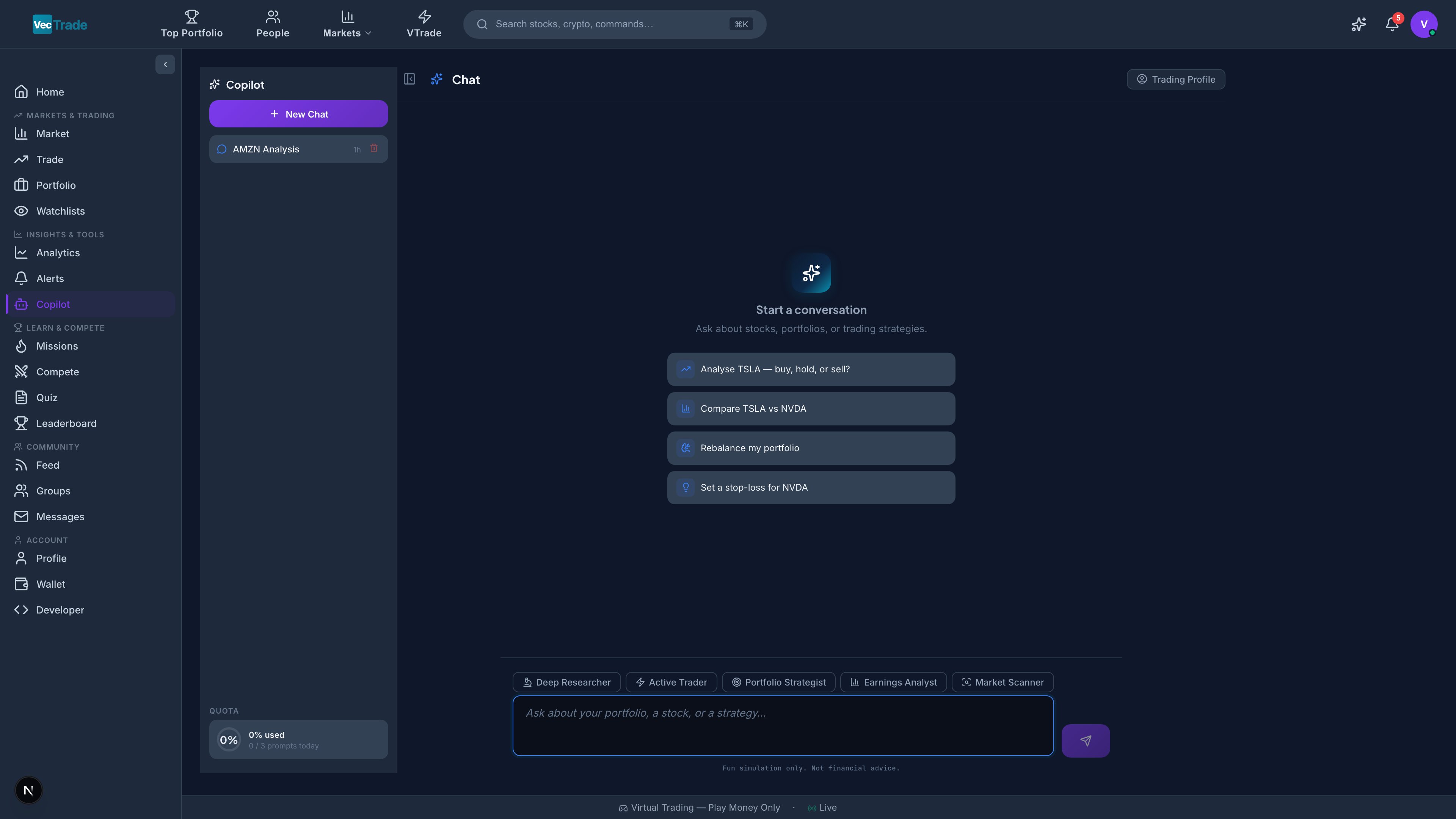
Interface Architecture

Left Panel — Conversation Management

ElementFunction
+ New ChatInitiates a fresh conversation context
Conversation HistoryChronological list of all past sessions (auto-titled from first message)
Search BarFull-text search across all conversation history (appears with 3+ conversations)
Recent RecommendationsQuick-access cards for the most recent trade recommendations generated
Usage QuotaCircular progress indicator showing remaining daily prompt allowance
CatalystsShortcut to the upcoming catalysts tracker
Thesis ManagerShortcut to investment thesis documents

Main Panel — Conversation Thread

The central area displays the conversation as an alternating message thread: Your Messages:
  • Displayed with your avatar and timestamp
  • Support markdown formatting, ticker mentions ($AAPL), and image uploads
Copilot Responses:
  • Tool Execution Badges — Animated indicators showing which tools are being invoked in real-time:
    • “Fetching AAPL quote…” → “Analyzing financials…” → “Running correlation…”
    • Each badge shows tool category icon and descriptive label
    • Execution timer shows elapsed processing time
  • Thinking Indicator — Animated dots while synthesizing data into a response
  • Response Content — Structured analysis with:
    • Markdown formatting (headers, tables, bold/italic, code blocks)
    • Interactive ticker links (clickable symbols navigate to stock detail pages)
    • Embedded mini-charts when relevant
    • Recommendation cards (detailed below)
    • Follow-up suggestion chips

Input Area — Message Composition

ElementFunction
Text InputAuto-expanding textarea for natural language queries
Mode ChipsSelectable analysis mode (above the input field)
Slash CommandType / to access command shortcuts
Send ButtonSubmit message (or press Enter)
Stop ButtonAbort an in-progress response (replaces Send during generation)

Capabilities Overview

Copilot understands and responds to a broad range of financial queries. Here is a structured overview of what you can ask:

Market Data & Quotes

Query TypeExample Prompts
Current price”What’s AAPL trading at right now?”
Historical price”What was NVDA’s price 6 months ago?”
Intraday movement”How has TSLA moved today? Show me the range.”
Sector overview”How is the technology sector performing today?”
Market breadth”Is the market bullish or bearish right now? Show me breadth data.”
Macro indicators”What’s the current US 10-year yield and how has it moved this week?”

Fundamental Analysis

Query TypeExample Prompts
Valuation”Is MSFT overvalued? Compare its P/E to sector median.”
Revenue analysis”Break down AAPL’s revenue by product segment.”
Earnings”Did META beat estimates last quarter? By how much?”
Balance sheet”What’s NVDA’s debt-to-equity ratio and how does it compare to AMD?”
Dividend analysis”What’s JNJ’s dividend yield, payout ratio, and 10-year growth rate?”
Cash flow”Is AMZN generating positive free cash flow? Show me the trend.”

Technical Analysis

Query TypeExample Prompts
Trend identification”Is AAPL in an uptrend or downtrend on the daily chart?”
Indicator readings”What are the RSI and MACD saying about TSLA right now?”
Support/resistance”Where are the key support and resistance levels for NVDA?”
Pattern recognition”Is there a double bottom forming on AMD?”
Moving averages”Where is GOOGL relative to its 50-day and 200-day SMA?”
Volume analysis”Has AAPL volume been increasing or decreasing on this rally?”

Portfolio Analysis

Query TypeExample Prompts
Risk assessment”Am I too concentrated in tech? What’s my sector exposure?”
Performance attribution”Which positions are dragging my portfolio down?”
Correlation analysis”Are my holdings too correlated? Show me the correlation matrix.”
Optimization”How can I reduce my portfolio’s volatility without sacrificing return?”
What-if scenarios”What happens to my risk profile if I sell TSLA and buy JNJ?”
Benchmark comparison”How does my YTD return compare to the S&P 500?”

Screening & Discovery

Query TypeExample Prompts
Value screens”Find undervalued large-caps with P/E below 15 and positive earnings growth.”
Growth screens”Show me small-caps with revenue growth above 30% and positive free cash flow.”
Dividend screens”Find dividend stocks yielding above 4% with less than 60% payout ratio.”
Technical screens”Which stocks just crossed above their 200-day moving average?”
Momentum screens”Show me the top 10 stocks by 3-month momentum in the S&P 500.”
Event-driven”Which stocks report earnings this week?”

Trade Execution (With Confirmation)

Query TypeExample Prompts
Market orders”Buy 10 shares of AAPL at market.”
Limit orders”Place a limit buy for 20 NVDA at $800.”
Stop-loss”Set a stop-loss on my TSLA position at $175.”
Bracket orders”Buy 50 MSFT with take-profit at 450andstoplossat450 and stop-loss at 380.”
Position close”Close my entire AMD position.”
Order cancellation”Cancel all my open orders on AAPL.”
Trade execution through Copilot always requires explicit user confirmation before submission. Copilot will present the order details and ask “Shall I proceed?” — you must confirm before any order is placed.

Tool Categories

Copilot’s 59 tools are organized into functional categories:

Market Data Tools (14 tools)

ToolData Retrieved
Live QuoteCurrent price, bid/ask, volume, change, 52-week range
Historical PricesOHLCV data for any time range
Key Statistics / FundamentalsFundamental ratios and trading stats
Analyst RatingsConsensus rating, price targets, upgrades/downgrades
Upgrades & DowngradesRecent analyst rating changes
Earnings DataEPS history, estimates, surprise %, next date
Earnings CalendarUpcoming earnings dates across the market
Earnings SurprisesHistorical beat/miss record and magnitude
Dividend InfoYield, payout ratio, ex-date, growth history
Options ChainFull chain with Greeks and IV for all expirations
News FeedRecent headlines for a ticker
Insider TradingForm 4 filings — buys and sells by executives
Insider RosterFull list of company insiders
Macro IndicatorsYields, Fed funds rate, CPI, unemployment, GDP

Research Tools (14 tools)

ToolData Retrieved
Financial StatementsIncome, balance sheet, cash flow (quarterly/annual)
TTM FinancialsTrailing twelve months financial data
SEC Filings10-K, 10-Q, 8-K documents
Congressional TradesStock transactions by US legislators
ESG / SustainabilityEnvironmental, Social, Governance ratings
Revenue BreakdownSegment and geographic revenue decomposition
Factor ExposureValue, momentum, quality, size factor loadings
Forward EstimatesAnalyst consensus forward estimates
Growth EstimatesRevenue and earnings growth projections
Earnings EstimatesDetailed EPS estimate breakdown
Institutional Holdings13F filings — major fund positions
Mutual Fund HoldersMutual fund ownership data
Volume ProfilePrice-volume distribution for key levels
Core AnalysisML-powered comprehensive stock analysis

Portfolio Tools (8 tools)

ToolData Retrieved
Portfolio ContextCurrent holdings with real-time P&L
Position HistoryClosed trades and their outcomes
Equity CurveHistorical portfolio value time series
Margin StatusUtilization, buying power, maintenance requirement
Activity FeedSocial feed of trades from users you follow
CorrelationPairwise correlation between holdings
What-If SimulationModel hypothetical portfolio changes
Rebalance PlanCalculate trades needed to reach target allocation

Screening & Analysis Tools (7 tools)

ToolCapability
Stock ComparisonMulti-ticker side-by-side fundamental/technical comparison
Stock ScreenerApply complex multi-criteria filters (templates or custom)
Search AssetsSearch for stocks by name or keyword
Sector PerformanceSector-level performance data
Sector RotationRanks all 11 GICS sectors by 1M/3M/YTD performance
Relative StrengthRelative performance vs benchmark
Risk ScoreComposite risk assessment for a ticker

Intelligence Tools (7 tools)

ToolCapability
Sentiment AnalysisMarket sentiment scoring for a ticker
ML PredictionMachine-learning-based price forecast
TechnicalsRSI, MACD, moving averages, support/resistance
Option GreeksBlack-Scholes Greeks calculation
Catalyst TrackerUpcoming events for holdings
BacktestSimple strategy backtesting
BriefingPersonalised market briefing generation

Trading Tools (9 tools)

ToolCapability
Place OrderSubmit market/limit/stop/stop-limit/trailing-stop orders
Place Bracket OrderEntry + take-profit + stop-loss linked orders
Place OCO OrderOne-cancels-other order pair
Cancel OrderCancel pending/working orders
Close PositionClose an entire position (or partial quantity)
Short Sell LocateCheck borrow availability and difficulty tier
Create Price RuleConditional price-triggered orders
List Price RulesView all active price rules
Cancel Price RuleRemove an active price rule
You never need to know tool names or invoke them manually. Simply describe what you want in natural language and Copilot automatically determines which tools are required, executes them in the optimal sequence, and synthesizes the results into a coherent response.

Analysis Modes

Mode selection controls the analytical approach and tool selection bias. Select a mode from the chips above the input area:
ModeBehaviorBest For
AutoCopilot determines the optimal approach based on your queryGeneral use — appropriate 90% of the time
ResearchPrioritizes fundamental data: financial statements, filings, ownership, revenue breakdownDeep-dive fundamental analysis, earnings research
TradingPrioritizes technical data: price action, indicators, support/resistance, momentumEntry/exit timing, chart analysis, day trading
PortfolioFocuses on your holdings: risk metrics, attribution, correlation, optimizationPortfolio review, risk management, rebalancing
EarningsEmphasizes earnings-specific data: estimates, surprises, guidance, revision historyPre-earnings research, post-earnings analysis
ScannerOptimized for screening: applies multi-criteria filters, returns ranked resultsIdea generation, watchlist building, opportunity discovery
Mode Behavior Details: In Auto mode (recommended default), Copilot analyzes your query semantics to determine the appropriate tool set. For example:
  • “Is AAPL overvalued?” → triggers Research mode tools (P/E comparison, DCF model, peer analysis)
  • “Where should I set my stop on NVDA?” → triggers Trading mode tools (support levels, ATR-based stop calculation)
  • “Am I too concentrated?” → triggers Portfolio mode tools (sector exposure, correlation matrix)
Switch to a specific mode when you want to force a particular analytical depth — for example, selecting Research ensures the full financial statement pull even for simple-sounding questions.

Trade Recommendations

When Copilot’s analysis identifies a potential trade opportunity, it generates a structured Recommendation Card:

Recommendation Card Components

FieldContent
ActionBUY / SELL / HOLD — displayed as a color-coded badge (green/red/grey)
SymbolTarget instrument with exchange badge
ConfidenceLow (< 40%) / Medium (40–70%) / High (> 70%) — based on signal convergence
Entry PriceSuggested entry level (current price for market, target for limit)
Target PricePrice objective / take-profit level
Stop-LossSuggested risk management exit level
Risk/RewardRatio of potential profit to potential loss (e.g., 2.5:1)
TimeframeExpected holding period: Intraday / Swing (1–5 days) / Position (1–12 weeks) / Long-term (3+ months)
Rationale3–5 bullet points explaining the thesis
Risk Factors2–3 bullet points identifying what could invalidate the thesis
Portfolio ImpactHow executing this trade would change your sector allocation, concentration, and beta

Interacting with Recommendations

ActionResult
ExecuteOpens Trading Desk with order pre-filled (symbol, side, quantity, price)
👍 Thumbs UpRates recommendation as useful — improves future personalization
👎 Thumbs DownRates recommendation as unhelpful — adjusts future behavior
SaveBookmarks the recommendation to the sidebar for later reference
ShareCreates a shareable post of the recommendation for your social feed

Follow-Up Suggestions

After each response, Copilot generates 3–5 contextually relevant follow-up questions displayed as clickable chips. These accelerate the research workflow by suggesting logical next steps. Example — After analyzing NVDA:
→ “Compare NVDA to AMD on key metrics” → “Show me NVDA’s options chain for next month” → “What’s the insider trading activity in the last 90 days?” → “Is this a good entry point based on technicals?” → “How would adding NVDA change my portfolio risk?”
Click any chip to send it as your next message without typing.

Slash Commands

Type / at the beginning of your message to access command shortcuts:
CommandDescriptionExample
/compareSide-by-side comparison of 2–5 securities/compare MSFT GOOGL META
/dcfDiscounted cash flow valuation model/dcf NVDA
/earningsEarnings analysis and upcoming dates/earnings AAPL
/riskPortfolio risk report (VaR, correlations, concentration)/risk
/screenRun a stock screen with natural language criteria/screen undervalued tech with high growth
/briefingPersonalised market briefing and portfolio summary/briefing
/sectorSector rotation and performance analysis/sector
/watchlistWatchlist overview and trend analysis/watchlist
Navigate the command autocomplete with ↑↓ arrow keys; press Tab or Enter to select.

Conversation Management

History & Organization

  • All conversations are automatically saved and accessible from the left panel
  • Auto-titling — Conversations are named based on your first message content
  • Chronological ordering — Most recent conversations appear at the top
  • Search — Full-text search across all historical conversations (by keyword, ticker, or topic)

Actions

ActionMethod
Start new conversationClick + New Chat in the sidebar
Find old conversationUse the search field in the sidebar
Delete conversationHover over conversation title → click trash icon → confirm
Continue a conversationClick any historical conversation to resume it

Context Windows

Each conversation maintains its own context. Copilot remembers:
  • All previous messages in the current conversation
  • Your portfolio state (positions, balance)
  • Preferences inferred from your interactions
  • Previously generated recommendations
Starting a New Chat creates a clean context — use this when switching to an unrelated topic.

Usage Quotas & Rate Limits

Your subscription plan determines daily Copilot usage:
PlanDaily Message LimitToken BudgetPriority
Free10 messagesStandardNormal queue
Pro50 messagesExtendedPriority queue
PremiumUnlimitedMaximumDedicated capacity
Quota Indicators:
  • Quota Ring (sidebar) — Circular progress indicator showing % consumed
  • Color States: Green (> 50% remaining) → Amber (10–50% remaining) → Red (< 10% remaining)
  • Exhausted State: Input bar disables with message: “Daily limit reached. Resets at 00:00 UTC or upgrade for more.”
Reset Schedule: Quotas reset daily at midnight UTC.

Catalysts Tracker

Access via the Catalysts link in the Copilot sidebar. The Catalysts Tracker monitors upcoming events that could materially affect your portfolio holdings:
Event TypeData SourceLead Time
Earnings AnnouncementsCompany IR calendars2–6 weeks ahead
Dividend DatesEx-date, record date, payment date4–6 weeks ahead
FDA DecisionsPDUFA calendar (biotech/pharma holdings)Known dates
Product LaunchesPress releases, confirmed eventsAs announced
Fed Meetings (FOMC)Federal Reserve schedulePublished annually
Macro Data ReleasesBLS, Census, Fed calendarPublished schedule
Options ExpirationMonthly/weekly OpEx datesStandard schedule
Index RebalancingS&P, NASDAQ rebalance datesQuarterly
Events are sorted chronologically with the nearest events first. Each entry shows: event type badge, date, instrument affected, and potential impact assessment (High / Medium / Low).

Investment Thesis Manager

Access via the Thesis Manager link in the Copilot sidebar. The Thesis Manager provides a structured framework for documenting and tracking investment theses:

Thesis Document Structure

SectionContent
Symbol & DirectionTicker, Long or Short, Date created
Core Thesis2–3 sentence summary of your investment rationale
Bull CaseOptimistic scenario and supporting evidence
Bear CasePessimistic scenario and risk factors
CatalystsUpcoming events that could validate or invalidate the thesis
Key Metrics to WatchSpecific numbers or indicators that confirm/deny the thesis
Entry CriteriaPrice levels or conditions for entering the trade
Exit CriteriaTake-profit and stop-loss conditions
Current StatusActive / Validated / Invalidated / Expired
UpdatesTimestamped notes as new information emerges

Thesis Actions

  • Create — Build a new thesis from scratch (or ask Copilot to generate a draft based on current data)
  • Update — Ask Copilot to refresh a thesis with the latest fundamentals, technicals, and news
  • Validate — Check whether your thesis conditions are being met
  • Export — Share a thesis as a formatted post to your trading group
  • Archive — Move completed/invalidated theses to history